Changelog
As of August 2025, this changelog has moved to customer release notes. Visit our documentation to stay up to date.
August 1, 2025
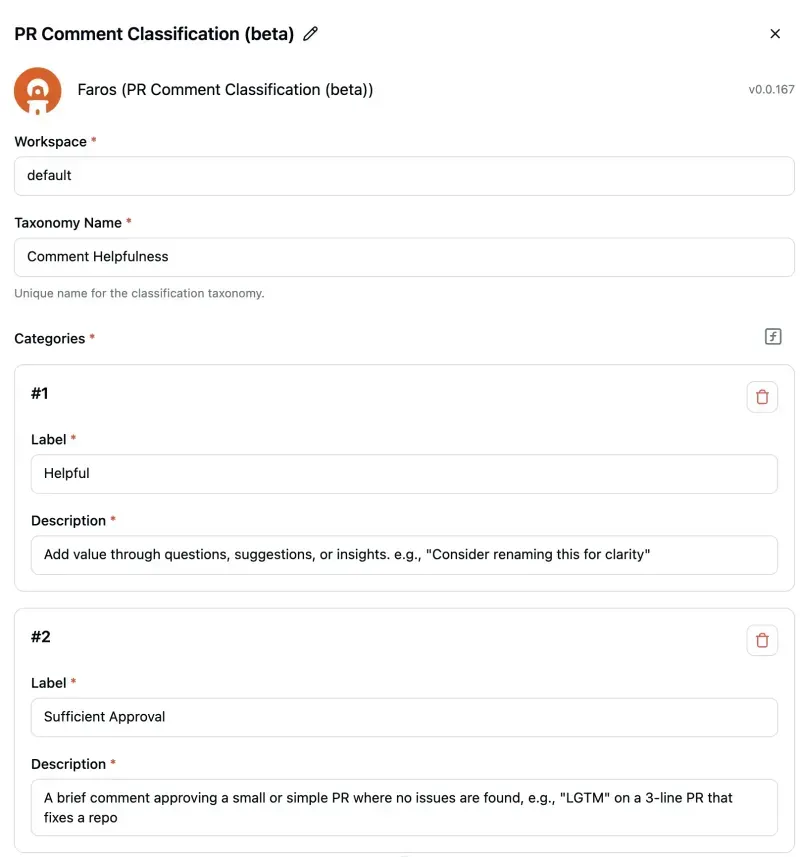
AI-Powered PR Comment Classification
We're excited to introduce the new PR Comment Classification feature, which automatically categorizes comments on pull requests based on their content.
This new capability helps teams:
- Quickly identify important discussions: Filter for specific categories to focus on the most critical conversations during code reviews.
- Understand team dynamics: Get a high-level view of the types of feedback being shared, helping to identify areas for improvement like better documentation if many questions are being asked.
- Save time: Avoid manually reading through hundreds of comments by getting a summarized view of discussions.
Unlock Deeper Insight
By combining these categorized comments with all your other engineering and business data within Faros, you can uncover powerful insights such as:
- Correlating comment types with PR lead time to understand bottlenecks.
- Analyzing the frequency of "Helpful" vs. "Fluff" comments across teams or projects to gauge code review effectiveness.
- Identifying documentation gaps by tracking the volume of "Question" comments relative to specific code areas.
- Tracking trends in feedback types over time to measure the impact of process improvements.
You can configure your own taxonomies and labels or use the provided default classification (Helpful, Sufficient Approval, Neutral/Procedural, and Fluff/Unhelpful) to start.
For more details on setting up and viewing results, please refer to our documentation.
August 1, 2025
AI-Powered PR Comment Classification
May 8, 2025
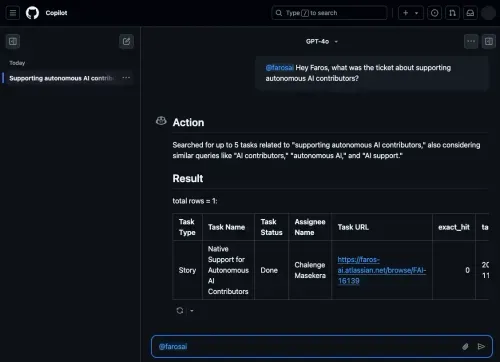
Our GitHub Copilot Chat Extension is live!
We are excited to launch our Faros AI Copilot Chat Extension in the GitHub Marketplace!
GitHub Copilot Chat Extensions provide a way to expand the functionality of GitHub Copilot Chat by integrating external tools and services into the chat experience.
With the Faros AI Copilot Chat Extension, developers can stay focused and get the context they need, without ever leaving their editor. It answers questions in real time by pulling relevant data from an organization’s engineering systems.
Example questions developers can ask include:
- Who last touched this file?
- What PRs are currently assigned to me for review?
- Who has contributed to this repo in the last month?
- Show me the tickets about mobile app crashing
By reducing context switching, this extension keeps productivity high and interruptions low.
Faros AI Assistant can be leveraged in all IDEs that currently support GitHub Copilot Extensions, including Visual Studio Code, Visual Studio, JetBrain IDEs such as IntelliJ IDEA and PyCharm, and GitHub.com.
May 8, 2025
Our GitHub Copilot Chat Extension is live!
May 1, 2025
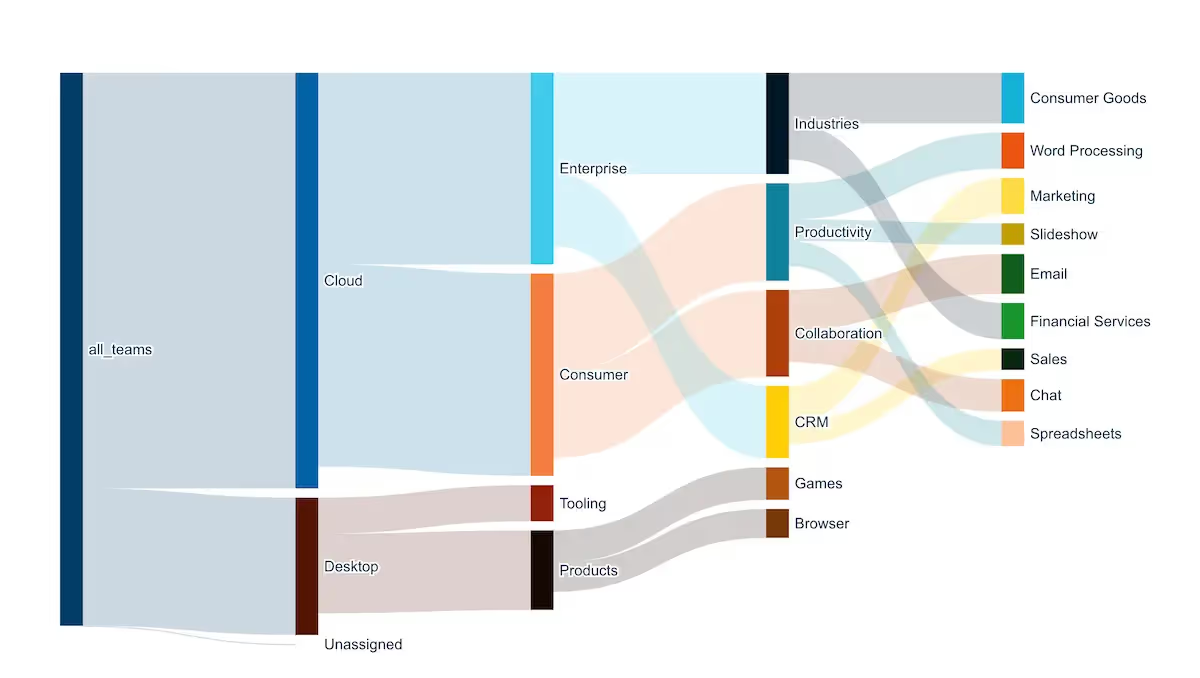
New dashboard functionality is here!
We're excited to announce some key improvements to our analytics platform, making it even more powerful and user-friendly!
Visualize flows with new chart types. Sankey charts let you explore relationships, hierarchies, or processes in a more interactive way—great for mapping org structures or pathways.
Save questions directly in dashboards. Keep things tidy by saving questions inside dashboards. They won’t show up in search or clutter other collections but stay connected to their dashboards.
Dynamic iframe parameters tied to filters. Iframe and embed cards can now update based on dashboard filters, giving you more contextual, interactive dashboards without manual updates.
Filter multiple values more easily. Refine your data faster with multi-select filtering for contains(), startsWith(), and more - no SQL needed.
Write simpler custom expressions. New shortcuts like if() make custom expressions easier to write, especially for Excel fans.
Dashboards load faster with smarter caching. Common query patterns are pre-cached, meaning you’ll wait less for dashboards to load.
Connect Dashboard Filters to Columns at Any Stage of the Query. You can now link filters to columns at any stage of the underlying query, including custom columns or intermediate steps. This offers greater flexibility in creating interactive dashboards.
Explore these updates in your dashboards today!
May 1, 2025
New dashboard functionality is here!
March 7, 2025
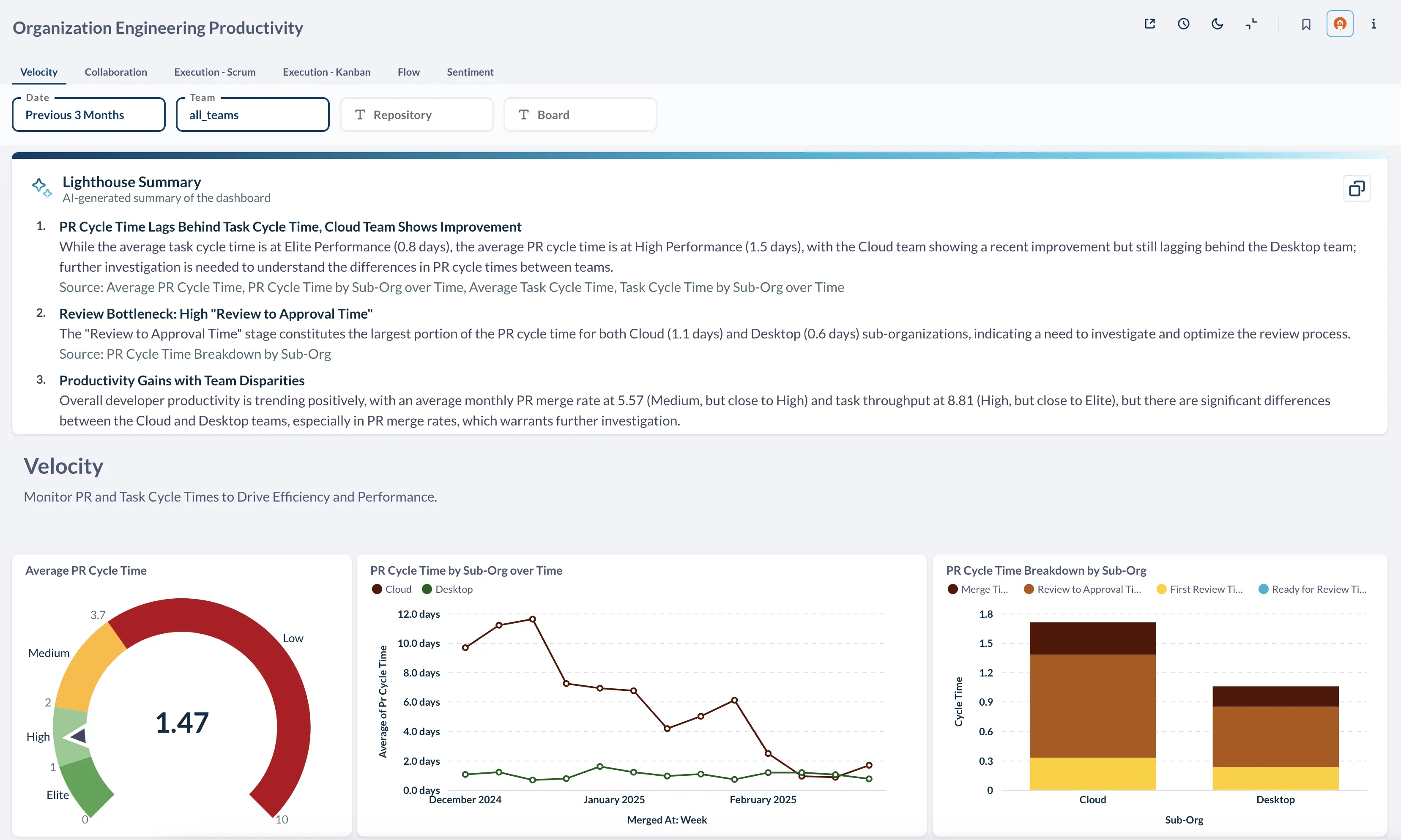
Insight Integration: Enhanced Dashboard Summaries
Enhanced dashboard summaries now allow analysts to easily integrate AI-generated summaries into dashboards and automate delivery, providing end-users with seamless access to key information. Previously, users accessed these summaries by clicking a button. Now you can integrate Lighthouse Summaries as components within dashboards or leverage our automation engine to automatically distribute summaries via Slack, email, or other preferred channels.
This means faster insights, better decisions, and a more connected understanding of your data, all without leaving your preferred workflow.
March 7, 2025
Insight Integration: Enhanced Dashboard Summaries
December 19, 2024
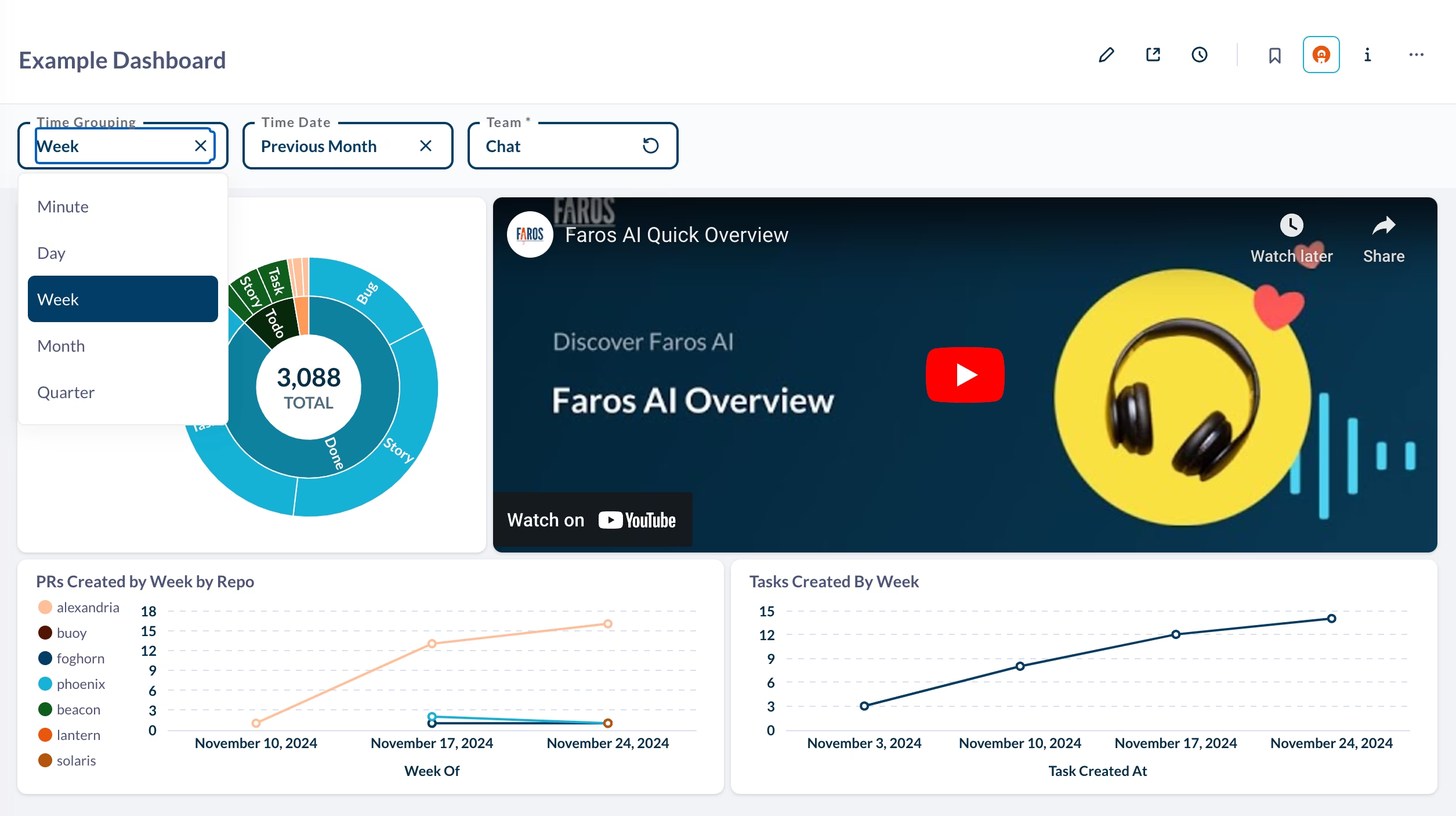
Level Up Your Dashboards: Latest Enhancements
We’re excited to introduce some powerful updates to our dashboard experience! These enhancements give you greater flexibility and control, making it easier than ever to construct the perfect dashboard.
Iframe Cards: Embed iframes into your dashboards to display things like loom videos, notion docs and more. If you have a custom domain you’d like to embed, please reach out to us.
Time Grouping Widget: Easily adjust how your charts are grouped by time—switch between months, weeks, or days to analyze your data with greater precision.
Enhanced Tooltips: Tooltips are now more powerful and customizable, allowing you to include a wider range of metrics for deeper insights.
Sunburst Charts: A brand-new visualization option to explore your data in an intuitive and dynamic way.
Pivot Table Downloads: You can now download all of your pivot tables with ease.
Offset Expression: Include base calculations based on other rows – just like excel!
There is much more! Everything from improved case statements, to templates, to better editing — ask us for details on a full list of new features!
December 19, 2024
Level Up Your Dashboards: Latest Enhancements
November 27, 2024
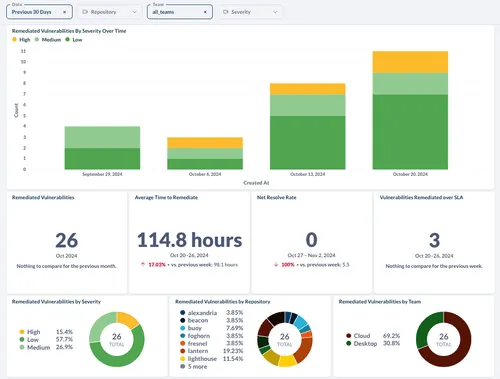
Our new Security Module
One pain point we’ve repeatedly heard from senior engineering managers and security/infra domain leads is the lack of visibility into the codebase’s security risks. This information tends to be scattered across multiple tools, preventing a unified view of the work to be done, which often leads to lingering vulnerabilities and missed SLAs.
We are launching a new Software Security module that helps you see the full picture and identify which repositories and teams need urgent attention. These new capabilities help ensure teams meet their SLAs, address security vulnerabilities, and reduce the company’s risk exposure.
Key benefits:
- Resolve vulnerabilities within SLAs with real-time tracking and team alerts for pending or overdue patches.
- Identify the most vulnerable parts of the codebase with a single unified view of security findings, and measure the ROI of security activities over time
- Monitor team-level security performance with vulnerability resolution performance. Identify which teams require more support or education on security best practices.
November 27, 2024
Our new Security Module
October 3, 2024
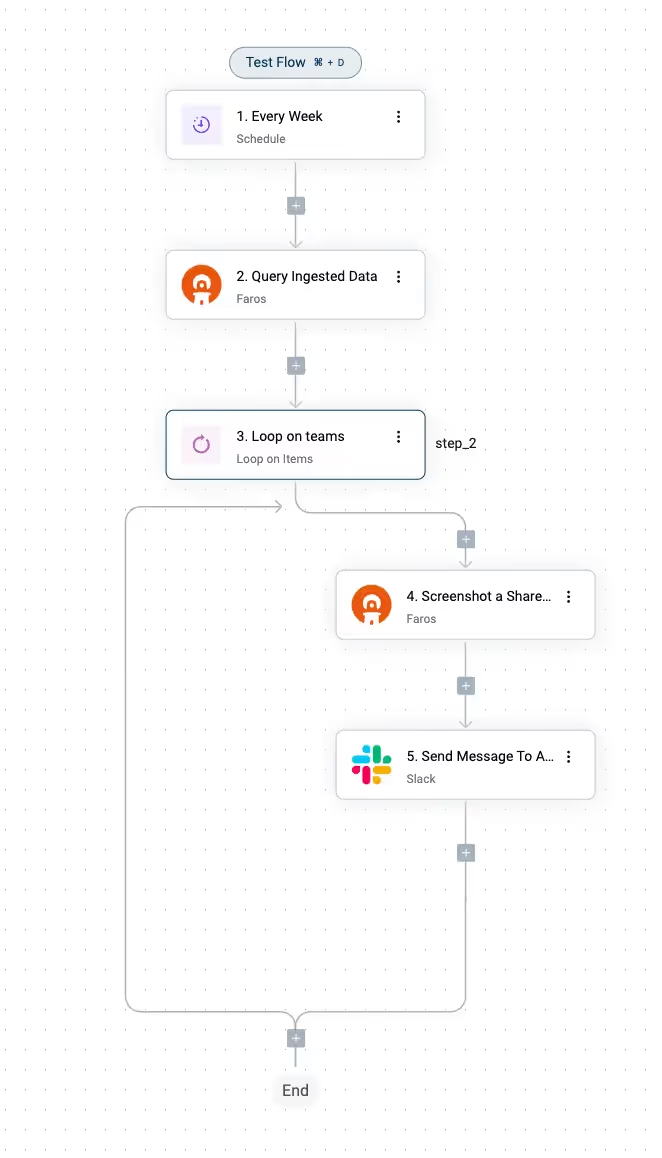
Completely Customizable Automation
Faros Automations leverage all your Faros data to remove friction and toil in day-to-day engineering operations. Automations can send alerts and reminders, enforce policies, and optimize workflows.
Faros is partnering with active-pieces, a best-in-class drag and drop automation engine. With Faros Automations, you can build cross-tool, time-saving automations that help improve speed, efficiency, quality, engagement, and business impact.
And, like so many parts of Faros, it's completely customizable. Faros Automations let you generate any action based on your Faros Data!
For example, you can:
- Take action faster with alerting around any generated metrics - Escalate breaches to SLA's with a PagerDuty integration
- Automate cognitively routine tasks - If someone hasn't contributed to a service in a month, remove their access
- Encourage best practices - Notify people on Slack when their GitHub PRs are consistently above the desired diff size
- Create more adaptive governance / policies based on multiple inputs - Add gate to Kubernetes that ensures PR can't be merged until team Quality metrics are improved
To start leveraging Faros Automations please reach out to our team at [email protected]
October 3, 2024
Completely Customizable Automation
September 26, 2024
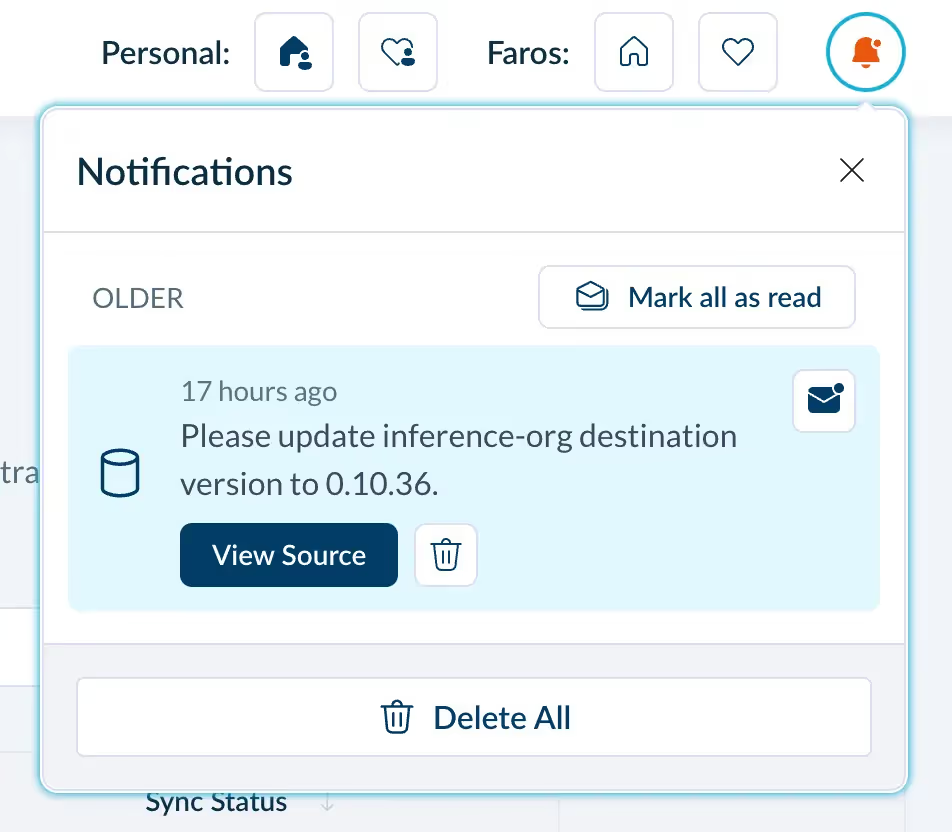
New Feature: Connection Failure Notifications
Stay informed with real-time alerts! We've added notifications to keep you updated whenever your data connections experience any issues, ensuring you can address problems promptly.
September 26, 2024
New Feature: Connection Failure Notifications
August 19, 2024

Enhanced Dashboard Performance with DuckDB
We have recently introduced DuckDB, a lightning-fast, in-memory database built for handling massive datasets.
The result? Dashboards now load up to 2.5x faster on average, with a whopping 2.8x improvement in P95 load times. That means less waiting and more time for valuable insights.
Our customers are thrilled with the transformation. As one of our Business Value Engineers put it:
"I spent my first day working in the tenant post-DuckDB migration yesterday. I needed to update a chart that used to be a coin toss on whether it’d load in 30 seconds or timeout. Now? It loads in under a second. Mind. Blown."
August 19, 2024
Enhanced Dashboard Performance with DuckDB
August 15, 2024

Improved Data Refresh for Faster Analytics
Improved Data Refresh for Faster Analytics
As we scale at Faros, we remain committed to improving the speed and reliability of our dashboards and metrics. Wit this in mind, we've focussed on the delivering the following features for our customers:
- Incremental data extraction: Efficient data replication into reports database.
- Optimizing flow queries: Streamlined data processing for faster transfer.
- Incremental metrics rebuilds: Ensures updates only include new or changed data, minimizing processing time.
These improvements have resulted in a 65% decrease in average sync times!
August 15, 2024
Improved Data Refresh for Faster Analytics
July 31, 2024

Investment Strategy Module
What’s the CFO’s biggest complaint about Engineering? That Finance simply does not understand how engineering’s output ties back to corporate strategy and objectives.
We’re solving that problem with a new Investment Strategy intelligence module that creates a joint understanding of the effectiveness and impact of software engineering investments.
With this new set of out-of-the-box dashboards for engineering and CFOs, as leaders you can:
- Assess the efficiency and financial impact of engineering initiatives
- Benchmark engineering overhead and team ratios against industry standards
- Evaluate the effectiveness of your talent mix and offshoring strategy
- Monitor the allocation of resources and time spent on critical company initiatives
The Investment Strategy Module is a premium add-on in the Faros platform; please contact Faros for more information.
July 31, 2024
Investment Strategy Module
June 13, 2024

GitHub Copilot Evaluation - now on the GitHub Marketplace!
We have released an App on the GitHub Marketplace to help engineering leaders evaluate the impact of GitHub Copilot on productivity and outcomes.
This App provides dashboards that help your organization confidently transition from pilots and evaluations to large-scale adoption.
We help:
- Track adoption and understand usage over time
- Measure the time savings and economic benefit
- Identify which teams benefit the most and how saved time is being reinvested
- Capture developer sentiment with out-of-the-box developer surveys
- Benchmark speed, quality, and security improvements against peers
- Observe before and after metrics, and compare the performance of Copilot-enabled developers vs. their peers
Benefits:
This set of Faros AI dashboards measures the impact of GitHub Copilot on software engineering and helps you get the rollout right.
- Improve rollout, training, and mentoring by understanding which teams and roles are adopting the fastest
- Easily present metrics and findings to executive leadership, helping to set the right expectations
- See where constraints and bottlenecks are emerging and mitigate unintended consequences quickly
- Identify unused licenses to maximize value
June 13, 2024
GitHub Copilot Evaluation - now on the GitHub Marketplace!
May 7, 2024

AI Copilot Evaluation Module
The AI Copilot Evaluation Module helps you maximize the value of coding assistants such as Github Copilot, Amazon Code Whisperer and others.
This module provides a view into adoption, developer sentiment, and downstream impact to help your organization:
- Track adoption and use over time
- Measure the time savings and economic benefit
- Identify which teams benefit the most and how saved time is being reinvested
- Monitor speed, quality, and security to mitigate unintended consequences and maximize value
May 7, 2024
AI Copilot Evaluation Module
May 2, 2024

Dashboards More Organized, Shareable, and Faster
Faros has upgraded its charting tool to include the dashboard tabs, downloadable charts and dashboards, improved layout, and more!
- Keep dashboards organized with tabs. Tabbed navigation helps consume the dashboard in smaller logical bites while persisting filters from tab to tab.
- Sharing is easier with downloadable dashboards. Skip the screenshots! One-click PDF export is now available for dashboards.
- Improved dashboard layout with an expanded grid. Get the polish and symmetry you like with a dashboard grid that’s grown from 18 to 24 squares.
- Auto-hide cards with no data. No data equals no clutter with this new feature. Keep things tidy and easier to consume by setting cards to auto-hide if they return no results.
- Load dashboards faster. You control when to apply filters instead of auto-applying them upon each change.
- Auto-wire up dashboard field filters. Filters are automatically connected to new cards you add to a dashboard.
May 2, 2024
Dashboards More Organized, Shareable, and Faster
April 29, 2024

Ingesting data with local sources just got easier
We're excited to enhance your experience with a significant update to our web application. While local sources have always been a part of your data toolkit, you can now monitor these sources directly on the 'Manage Sources' page of our platform. This update centralizes the visibility of all data importation methods, enabling you to effortlessly oversee and debug issues across both local and cloud-based sources.
With the change, you can now view the configuration, see sync status and explore the sync history in the Sources page for every connector, whether local or cloud-based. Sync logs are also available in the Faros web application, making it even easier to debug issues with your team and with the help of Faros Support.
April 29, 2024
Ingesting data with local sources just got easier