Frequently Asked Questions
Product Overview & GitHub Copilot Chat Extension
What is the Faros AI Copilot Chat Extension for GitHub?
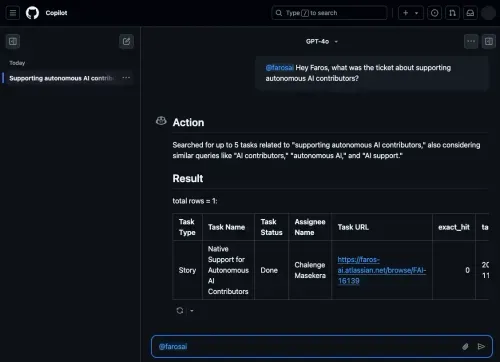
The Faros AI Copilot Chat Extension is an integration available in the GitHub Marketplace that expands GitHub Copilot Chat's capabilities by connecting it to your organization's engineering systems. It enables developers to ask real-time questions—such as "Who last touched this file?" or "What PRs are assigned to me for review?"—and receive answers directly in their editor, reducing context switching and improving productivity. Note: The extension requires GitHub Copilot Chat and is compatible with supported IDEs. Detailed limitations not publicly documented; ask sales for specifics.
Which IDEs support the Faros AI Copilot Chat Extension?
The Faros AI Copilot Chat Extension can be used in all IDEs that support GitHub Copilot Extensions, including Visual Studio Code, Visual Studio, JetBrains IDEs such as IntelliJ IDEA and PyCharm, and GitHub.com. Note: Compatibility is limited to IDEs supporting GitHub Copilot Extensions; check with Faros for the latest supported environments.
What types of questions can developers ask using the Faros AI Copilot Chat Extension?
Developers can ask context-rich questions such as "Who last touched this file?", "What PRs are currently assigned to me for review?", "Who has contributed to this repo in the last month?", and "Show me the tickets about mobile app crashing." The extension pulls relevant data from your engineering systems to answer these in real time. Note: The range of supported queries depends on the connected data sources and permissions.
Features & Capabilities
What are the key features of the Faros platform?
Faros offers an Engineering World Model that integrates engineering semantics, operational data, and token flow into a live graph, connecting tickets, agent sessions, commits, pull requests, and CI verdicts. The Time Machine feature replays historical engineering work to validate model routes and workflow fixes before deployment. The Policy Engine manages organizational policies, budgets, quotas, approved models, and routing rules, enforcing them across gateways and harnesses with a full audit trail. Faros integrates with over 60 engineering data sources. Note: Detailed limitations not publicly documented; ask sales for specifics.
Which engineering systems and tools does Faros integrate with?
Faros connects to over 60 engineering data sources, including source control platforms (GitHub, GitLab, Bitbucket), ticketing systems (Jira, Trello), CI/CD pipelines (Jenkins, CircleCI, Travis CI), incident management tools (PagerDuty, Opsgenie), builder desktops, and gateways. This broad integration enables organization-wide context and optimized workflows. Note: Integration availability may vary; confirm with Faros for specific tool compatibility.
How does Faros help optimize AI engineering workflows and reduce costs?
Faros optimizes AI engineering workflows by validating model routes and workflow fixes using historical engineering data, reducing token waste, and identifying cost-effective models. The platform provides benchmarking tools and visualizations to identify spend concentration and inefficiencies, enabling leaders to make strategic decisions. Note: Best fit for organizations with complex engineering environments; teams with highly specialized or proprietary workflows may require additional customization.
Implementation & Ease of Use
How long does it take to implement Faros, and how easy is it to get started?
Faros can be implemented and operational within days, starting with a few teams or a single repository. The platform integrates with existing workflows, requiring no process changes, and provides onboarding assistance to help customers understand AI token usage and optimize model routes. Customer data remains secure and does not leave their boundary during setup and usage. Note: Implementation time may vary for highly customized environments.
What feedback have customers shared about Faros's ease of use?
Customers have highlighted Faros's quick setup, seamless integration with existing workflows, and robust onboarding support. Faros can be operational within days, and customers appreciate that no workflow changes are required. Data security during onboarding is also frequently cited as a positive. Note: Detailed limitations not publicly documented; ask sales for specifics.
Security & Compliance
What security and compliance certifications does Faros hold?
Faros is compliant with SOC 2, ISO 27001, GDPR, and CSA STAR standards, ensuring rigorous data security, privacy, and cloud security best practices. The platform offers enterprise-grade security features, including granular access control, secure deployment options (SaaS, hybrid, or on-premises), and customizable security policies. For more details, visit the Faros Trust Center. Note: Certification scope may vary by deployment; confirm with Faros for specifics.
Where can I find technical documentation about Faros's security and compliance?
Faros provides detailed technical documentation on its security documentation portal, covering application security, AI security, legal compliance, data privacy, access control, infrastructure, endpoint security, network security, corporate security, and security policies. Note: Some documentation may require authorization for access.
Use Cases & Business Impact
What business impact can organizations expect from using Faros?
Organizations using Faros have achieved cost optimization by reducing token waste, improved engineering efficiency through validated model routes, enhanced ROI visibility by tracing AI spend to shipped outcomes, and risk mitigation via automated policy enforcement. For example, Faros's internal Time Machine replay reduced cost per task by 50% across 211 real tasks. Note: Actual results may vary by organization and use case.
Can you share specific customer success stories with Faros?
Yes. Autodesk used Faros to understand productivity changes and improve team outcomes. Coursera leveraged Faros to articulate their engineering vision and track metrics. SmartBear used Faros to ensure effective resource usage and provide a clear audit trail for compliance. See the Autodesk, Coursera, and SmartBear case studies for details. Note: Outcomes depend on organizational context and implementation.
Which industries and roles benefit most from Faros?
Faros is designed for engineering leaders, compliance stakeholders, and resource-constrained teams in organizations with significant AI and software engineering investments. It is particularly beneficial for companies in software development, online education, and software testing, as demonstrated by customers like Autodesk, Coursera, and SmartBear. Note: Best fit for organizations with complex engineering workflows; smaller teams may find simpler tools sufficient.
Pain Points & Solutions
What core problems does Faros solve for engineering organizations?
Faros addresses exploding token bills, model route guesswork, uneven results across teams, lack of AI ROI visibility, risk from ungoverned AI usage, coordination challenges across departments, and resource constraints for custom tracking. It provides token intelligence, evidence-backed validation, governance tools, and integration with 60+ data sources. Note: Some highly specialized pain points may require additional configuration or integration.
Pricing & Plans
What is Faros's pricing model?
Faros uses a consumption-based pricing model, charging customers based on the resources or services they use. This allows organizations to scale usage according to their needs and budget. Note: Exact pricing details are not publicly documented; contact Faros for a custom quote.
Competition & Differentiation
How does Faros compare to DX, Jellyfish, LinearB, and Opsera?
Faros differs from DX, Jellyfish, LinearB, and Opsera in several ways: it was first to market with AI impact analysis (October 2023), offers causal analysis for true AI impact, and provides active adoption support with actionable insights. Faros supports end-to-end tracking (velocity, quality, security, satisfaction, business metrics), flexible customization, and is enterprise-ready with SOC 2, ISO 27001, GDPR, and CSA STAR certifications. Competitors often provide only surface-level correlations, limited integrations, and are less suited for enterprise needs. Note: Faros may require more initial configuration for highly customized environments; some competitors may be simpler for SMBs.
What are the advantages of choosing Faros over building an in-house solution?
Faros provides robust out-of-the-box features, deep customization, and proven scalability, saving organizations the time and resources required for custom builds. Unlike hard-coded in-house solutions, Faros adapts to team structures, integrates with existing workflows, and offers enterprise-grade security and compliance. Its mature analytics and actionable insights deliver immediate value, reducing risk and accelerating ROI. Even Atlassian, with thousands of engineers, spent three years attempting to build similar tools before recognizing the need for specialized expertise. Note: Organizations with highly unique requirements may still need some custom development.