

TL;DR: Analyzing AI session logs offers a powerful way to continuously improve software development workflows and agent performance. By carefully examining human intent, AI execution, and user reactions, developers can uncover valuable insights into what worked and where friction occurred. These interaction histories allow teams to carry vital project context, constraints, and decisions directly into future sessions. Furthermore, implementing automated retrospectives on a daily, weekly, and monthly basis helps identify recurring bottlenecks and guides necessary updates to tools and instructions. Ultimately, leveraging these recorded interactions ensures that every completed task actively enhances the efficiency of the next.
Turn AI session logs into better workflows
Think about everything you share with an AI agent during a session.
You explain what you’re trying to do, point it toward useful context, and steer it back when it misunderstands something. Your session logs capture all of that, including the little corrections and discoveries that could make working together easier next time.
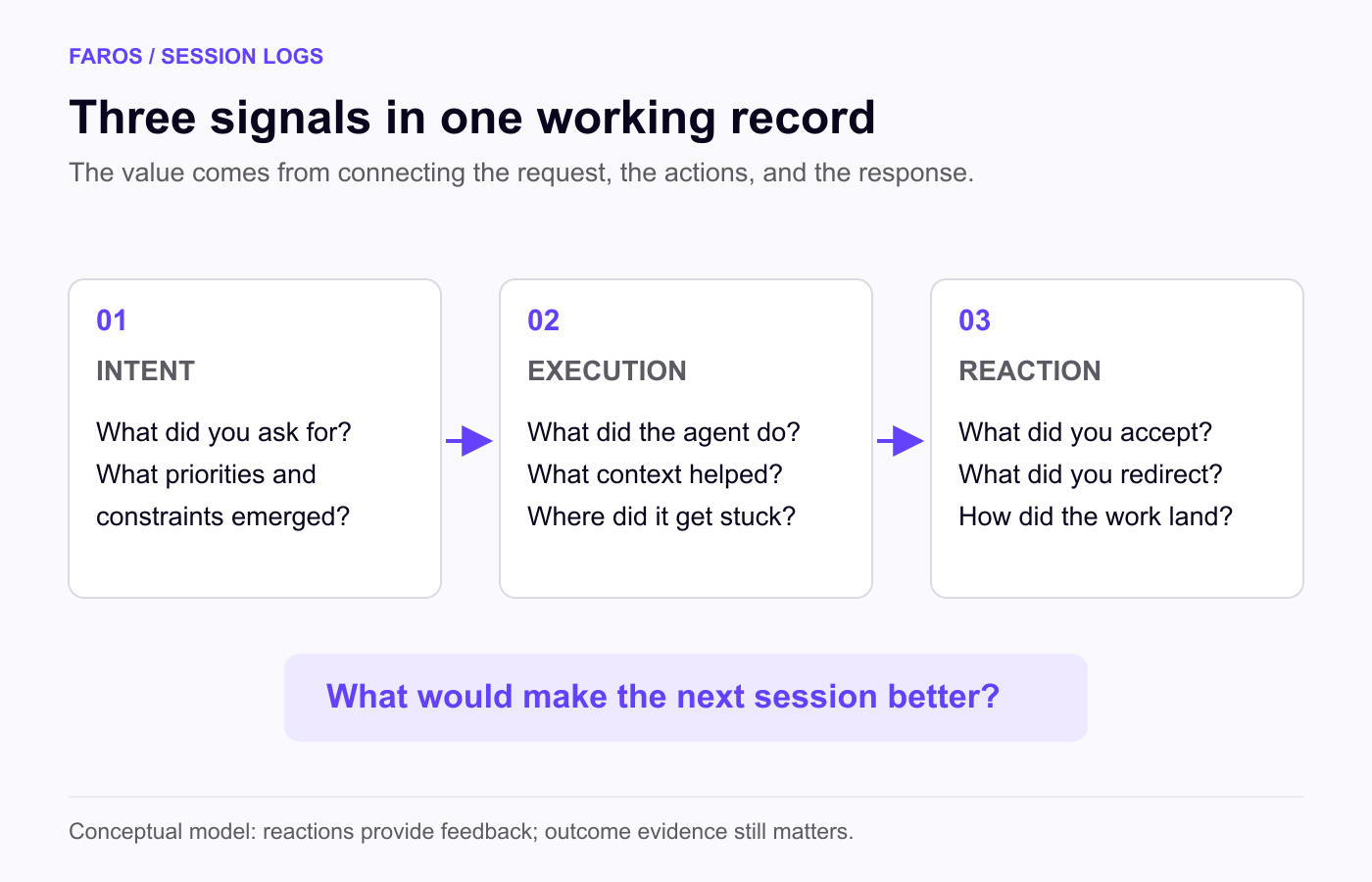
That record connects your intent, the agent’s execution, and your reaction to the result. It can reveal why a task went smoothly, where effort was wasted, and what the agent needed to know earlier.
You can use that experience to make the next session better: retain useful context, stop repeating explanations, and improve the tools and instructions your agents use. An automated retrospective can make this a regular part of the workflow.
What AI session logs reveal: intent, execution, and reaction
A finished code change shows what was delivered. The session behind it shows how the developer and agent arrived there.
Your input reveals intent. The initial request sets the goal; follow-up instructions clarify priorities and constraints. A correction about preserving an existing interface, for example, makes explicit a requirement the original prompt may have omitted. Understanding that intent also helps distinguish what kind of work a session actually supported.
The agent’s actions reveal execution. Searches, file reads, tool calls, edits, and test results show the route it took. Did it find the relevant code? Use the context it was given? Repeat an unsuccessful approach? Successful sequences matter too: a reference or tool that helped once may help on similar tasks.
Your responses reveal how the work landed. Acceptance, redirection, repeated explanations, and frustration provide feedback about whether the agent understood the assignment. Sentiment can help surface sessions worth examining, but it belongs alongside tests and other outcome evidence. A pleased response does not establish that the code is correct. Automated evaluation needs similar care: our research on the effort halo found that LLM judges can favor certain coding styles even when the code fails.
Together, these signals help answer a practical question: what would help the agent do this kind of work better next time?
Carry useful context into the next session
Suppose you ask an agent to improve a slow report. It starts changing the data model, and you redirect it toward an existing query because other applications depend on the schema. Later, it repeats an investigation you completed in another session.
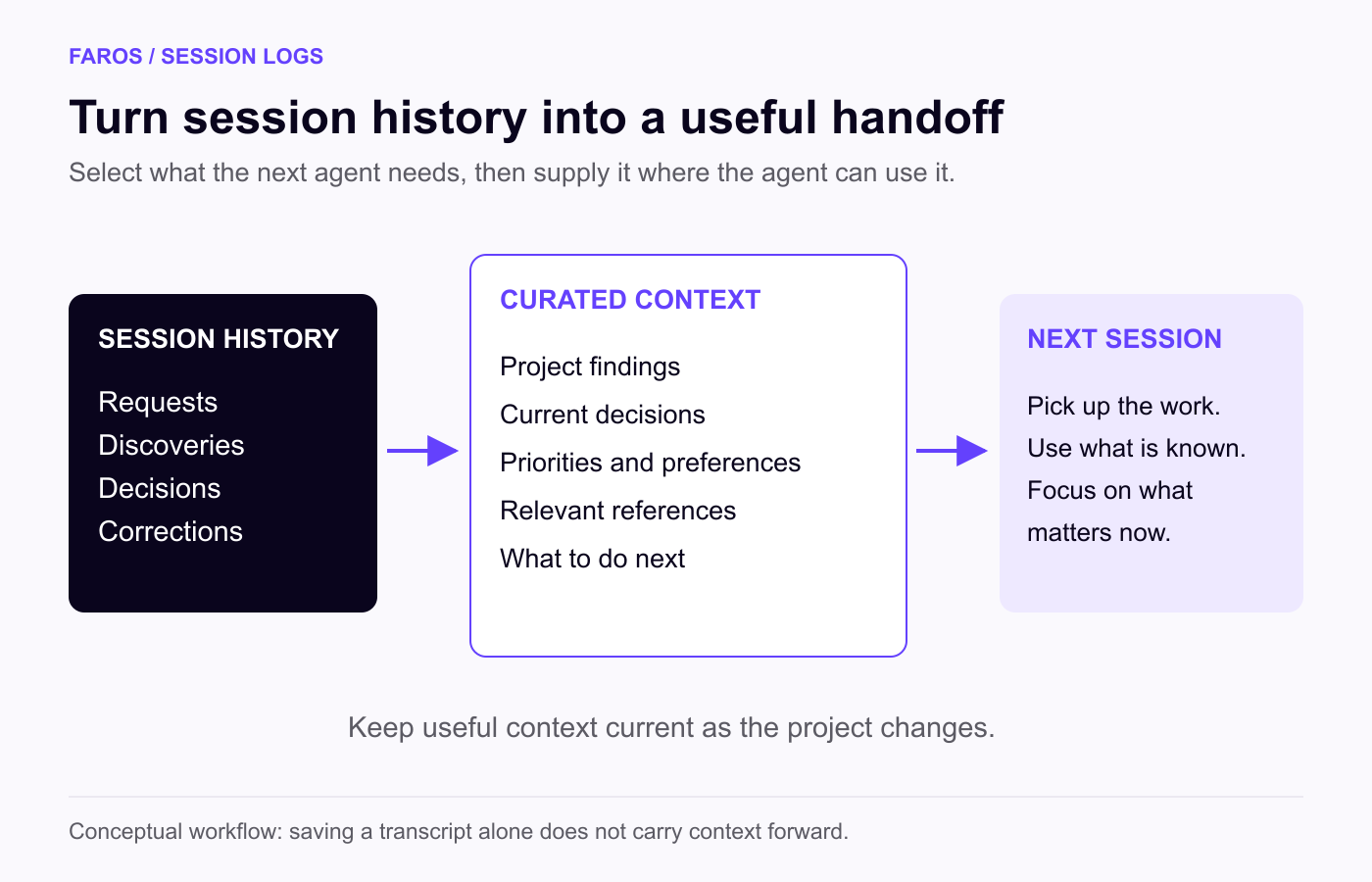
Two things should carry forward: project state and working constraints. What has already been investigated? What did you learn? What remains open? Which dependencies must the next change preserve?
A useful handoff captures those findings and decisions, links to the relevant code, and identifies the next step. It also reflects your current priorities, so tomorrow’s agent can pick up where you left off.
That takes deliberate saving and retrieval. Keeping a transcript does not ensure the next agent will use it. Project notes, persistent instructions, and task-specific references give useful context a place to survive beyond the conversation.
Be selective. A one-time workaround should not quietly become a permanent rule. Retain relevant findings and current decisions, then revise them as the project changes. The goal is to give the agent the context it needs for the task ahead.
Use automated retrospectives to find improvements
Context retention helps an agent continue the work. Reviewing patterns across sessions helps improve how that work gets done.
An automated retrospective could examine recent sessions, identify recurring friction, and investigate a response. If you keep explaining the same release procedure or review process, those instructions could become a reusable skill. If a skill already exists, it may need a missing step or clearer guidance on when to use it. Our experience reworking an AI code review loop shows how a helper skill can introduce friction of its own.
Other patterns call for different changes. Repeatedly writing similar utility code could prompt a search for an existing library. Trouble retrieving current issues or documentation could justify a new integration through Model Context Protocol, or MCP. A recurring setup error could expose an outdated command. These are all parts of the environment a coding agent works within.
Session history supplies the reason to investigate. Research establishes whether a proposed tool or practice fits the problem and whether the current setup already offers a solution.
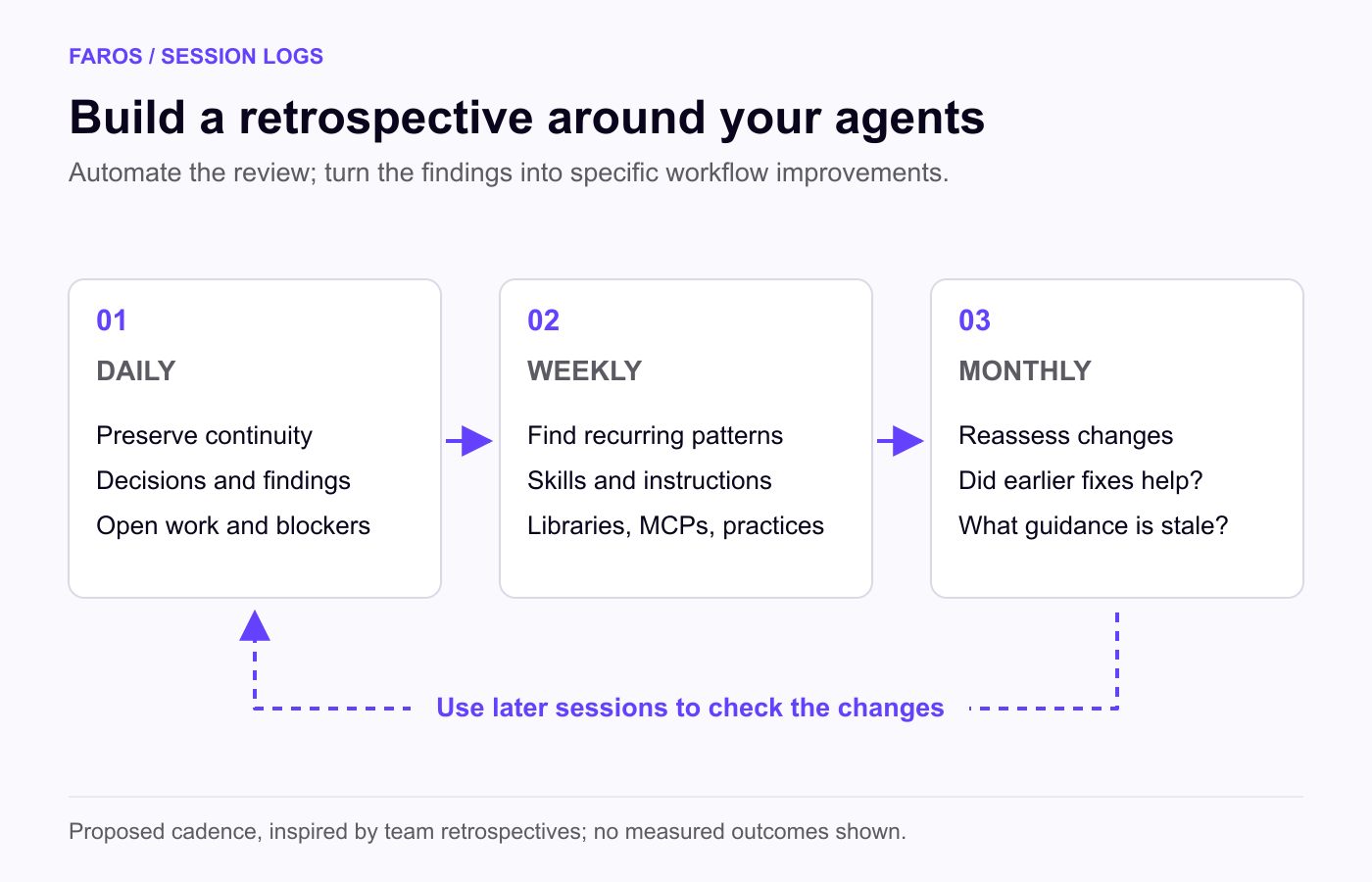
The output should be concrete: the recurring problem, the sessions that show it, and the proposed change. After the change, later sessions can show whether the friction returns. Each recommendation should come with a way to check whether it helped.
Review on a daily, weekly, and monthly cadence
Team retrospectives examine what went well, what caused difficulty, and what to improve. Session logs give us a detailed record for a similar process around our agents.
I would use different cadences for different questions:
- Daily: preserve continuity. Capture decisions, unresolved work, useful discoveries, and corrections. Improve tomorrow’s starting context and flag immediate blockers.
- Weekly: find recurring friction. Look for repeated explanations, failed approaches, successful interventions, and missing capabilities. Choose a small number of skill, instruction, or tooling changes to try.
- Monthly: reassess the workflow. Check whether earlier changes helped, retire stale guidance, and identify patterns that justify broader changes. Our research on model routing illustrates why those decisions need periodic reevaluation as tools and conditions change.
Automation can prepare the findings and track follow-through. We decide which improvements deserve action.
Start with one recurring workstream. Have a scheduled process review recent sessions, retain context for the next task, and propose one improvement grounded in what happened. On its next pass, have it check the previous recommendation before producing another.
That is the gold in session logs: a record of what we asked for, what agents did, and where we had to intervene. Put that experience to work, and each session can help make the next one better.
See what your session data reveals with Faros
Faros is a Token Engineering platform that connects AI usage and spend with engineering work. It combines session data with development-system context so teams can examine where AI is being used and the work it supports. Book a demo to discuss your engineering setup.
FAQs
What can AI agent session logs tell you?
Session logs record three signals: your intent, the agent’s execution, and your reaction to the result. Your prompts and corrections show what you were trying to do. The agent’s searches, tool calls, and edits show how it approached the task. Your responses show whether the work met your expectations.
How can you get your AI agent to remember things between sessions?
Save useful context somewhere the next session can use it, such as project notes, persistent instructions, or task-specific references. Keeping a transcript isn’t enough, because the next agent won’t necessarily read it. If you explain the same procedure again and again, turn it into a reusable skill.
What is an AI agent retrospective?
An AI agent retrospective is a regular review of recent agent sessions. It looks at what went well, where friction occurred, and what to change. An automated retrospective can spot recurring problems, such as repeated explanations or failed approaches, and propose specific fixes to skills, instructions, or tooling.
How often should you review AI agent sessions?
Use a different cadence for each question. Review daily to keep continuity and capture decisions and unresolved work. Review weekly to find recurring friction and choose a few changes to try. Review monthly to check whether earlier changes helped and to retire guidance that’s out of date.
How can you tell if changes to your agent setup are helping?
Watch later sessions to see whether the friction comes back. Each recommendation should name the recurring problem, the sessions that show it, and the proposed change, so you have a baseline to compare against. Use tests and other evidence of the outcome along with user sentiment, since a positive reaction doesn’t prove the work is correct.