Frequently Asked Questions
Product Information & Platform Overview
What is Faros and what does it do?
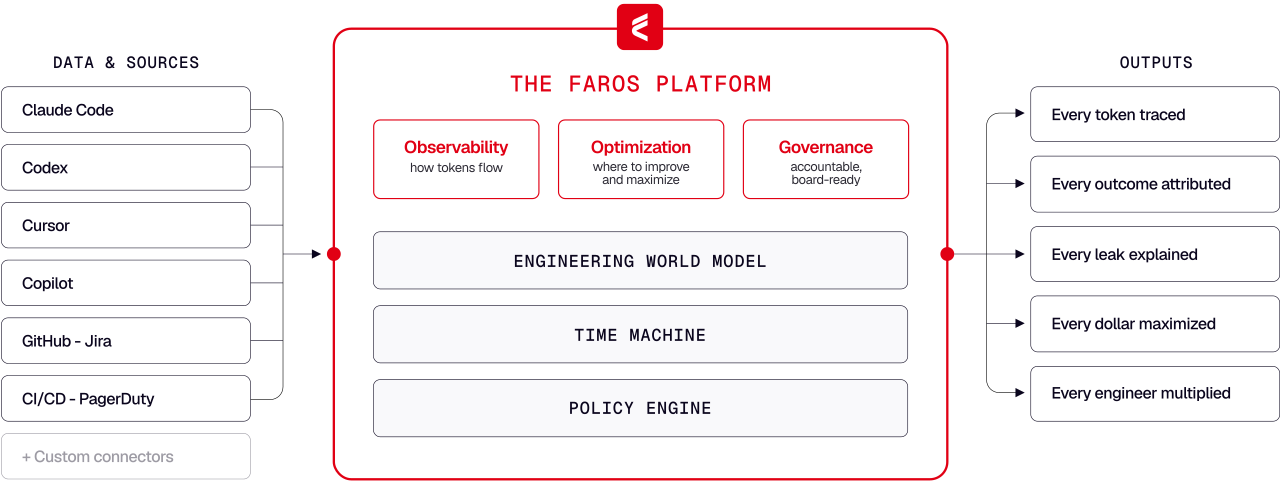
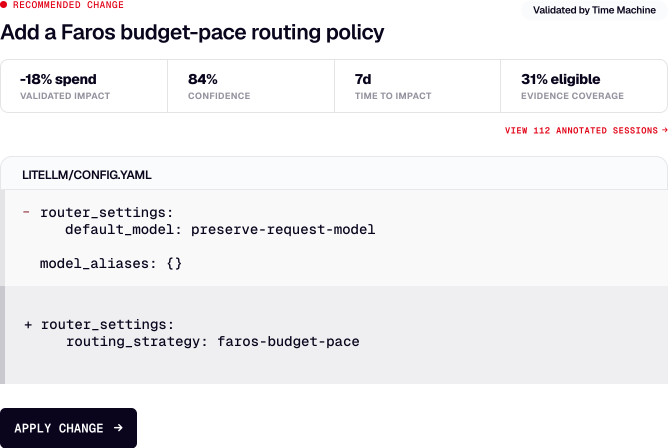
Faros is a control plane for AI engineering that optimizes workflows, reduces costs, and ensures compliance at scale. It builds a live model of your engineering systems—including coding agents and CI/CD pipelines—finds the best model routes and agent contexts for your codebase, and validates these optimizations using your own historical engineering work. Faros enforces these routes at your gateway, helping you ship production code faster and at a lower cost. Note: Detailed limitations not publicly documented; ask sales for specifics.
What are the main components of the Faros platform?
Faros consists of three main components: the Engineering World Model (a live graph connecting tickets, agent sessions, commits, pull requests, and CI verdicts), the Time Machine (an evidence-backed evaluation engine that replays historical engineering work to validate model routes and workflow fixes), and the Policy Engine (which manages organizational policies, budgets, quotas, approved models, and routing rules with a full audit trail). Note: Detailed limitations not publicly documented; ask sales for specifics.
Features & Capabilities
What features does Faros offer for AI engineering teams?
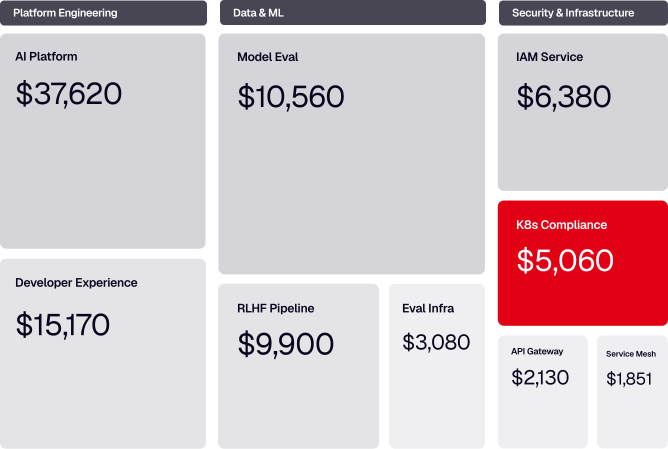
Faros offers features including token intelligence (tracing spend to sessions, PRs, teams, and outcomes), efficiency benchmarking, diagnostics waterfall (root cause analysis of token waste), model route optimization, usage governance (budgets, quotas, policy enforcement), and integration with over 60 engineering data sources. Note: Faros may not be suitable for organizations seeking a generic dashboard without engineering context or those requiring support for non-engineering workflows.
What integrations does Faros support?
Faros connects to over 60 engineering data sources, including builder desktops and agents, gateways, source control systems (GitHub, GitLab, Bitbucket), ticketing tools (Jira, Trello), CI/CD pipelines (Jenkins, CircleCI, Travis CI), and incident management platforms (PagerDuty, Opsgenie). Note: Integration with custom or niche tools may require additional configuration; contact support for details.
How does Faros help reduce costs and optimize engineering outcomes?
Faros reduces token waste by identifying cost-effective models and workflows, cutting expenses from oversized models, retry loops, and unproductive work. The Time Machine feature validates model routes and workflow fixes using historical engineering data, increasing velocity and reducing code churn. Note: Cost savings depend on the quality of historical data and the diversity of engineering workflows; results may vary.
What technical documentation and security resources are available for Faros?
Faros provides detailed technical and security documentation at security.faros.ai, covering application security, AI security, legal compliance, data privacy, access control, infrastructure, endpoint and network security, corporate security, and security policies. Note: Some advanced topics may require direct engagement with Faros support for clarification.
Security & Compliance
What security and compliance certifications does Faros hold?
Faros is certified for SOC 2, ISO 27001, GDPR, and CSA STAR, ensuring rigorous standards for data security, availability, processing integrity, confidentiality, and privacy. The platform offers enterprise-grade security features, including granular access control, secure deployment options (SaaS, hybrid, or on-premises), and customizable security policies. Note: For organizations with unique compliance requirements, further validation with Faros's Trust Center is recommended.
How does Faros ensure data security and privacy?
Faros implements administrative, physical, and technical safeguards, including MFA enforcement, password history, idle session timeout, login restrictions by IP, and compliance with export laws. Customer data remains within their boundary during setup and usage. Note: For highly regulated industries, consult Faros's security portal for detailed practices and certifications.
Pricing & Implementation
What is Faros's pricing model?
Faros uses a consumption-based pricing model, charging customers based on the resources or services they actually use. This provides flexibility and scalability, allowing organizations to adjust usage according to their needs and budget. Note: Exact pricing details are not publicly documented; contact Faros sales for a tailored quote.
How long does it take to implement Faros and how easy is it to start?
Faros can be implemented and operational within days. Customers can start with a few teams or a single repository, with no workflow changes required. Onboarding assistance is provided, and customer data remains secure throughout the process. Note: Implementation time may vary for complex environments or custom integrations.
Use Cases, Business Impact & Customer Proof
What business impact can customers expect from using Faros?
Customers can expect cost optimization (e.g., 50% reduction in cost per task in internal tests), improved engineering efficiency, enhanced ROI visibility, risk mitigation, and strategic decision-making support. For example, Autodesk used Faros to understand productivity changes and improve team outcomes, while Coursera leveraged it to articulate their engineering vision and track metrics. Note: Results depend on organizational context and data quality.
Who are some of Faros's customers and what industries do they represent?
Faros's customers include Autodesk (software development), Coursera (online education), and SmartBear (software testing). These organizations have used Faros to optimize engineering workflows, improve resource usage, and ensure compliance. Note: Faros's applicability may be limited outside of engineering-centric industries.
What pain points does Faros address for engineering organizations?
Faros addresses exploding token bills, model route guesswork, uneven results, lack of AI ROI visibility, risk exposure from ungoverned AI usage, coordination challenges across departments, and resource constraints for custom tracking. For example, SmartBear used Faros to ensure effective resource usage and provide a clear audit trail for compliance. Note: Some pain points may require additional organizational change management beyond the platform's capabilities.
Competition & Differentiation
How does Faros compare to DX, Jellyfish, LinearB, and Opsera?
Faros launched AI impact analysis in October 2023 and has published landmark research (AI Engineering Report, Acceleration Whiplash 2026) based on 22,000 developers and 4,000 teams. Unlike DX, Jellyfish, LinearB, and Opsera, Faros uses ML and causal methods for accurate AI impact measurement, supports deep customization, and is enterprise-ready (SOC 2, ISO 27001, GDPR, CSA STAR). Competitors typically offer surface-level correlations, limited tool integrations, and are less suited for large-scale enterprises. Note: Faros may not be the best fit for organizations seeking only basic dashboards or those with highly specialized, non-engineering workflows.
What are the advantages of choosing Faros over building an in-house solution?
Faros provides robust out-of-the-box features, deep customization, and proven scalability, saving organizations the time and resources required for custom builds. Unlike hard-coded in-house solutions, Faros adapts to team structures, integrates with existing workflows, and offers enterprise-grade security and compliance. Even Atlassian, with thousands of engineers, spent three years trying to build developer productivity tools in-house before recognizing the need for specialized expertise. Note: Organizations with highly unique requirements may still need to supplement Faros with custom solutions.
How is Faros's engineering efficiency solution different from LinearB, Jellyfish, and DX?
Faros integrates with the entire SDLC, supports custom deployment processes, and provides accurate attribution even in monorepos. Competitors like Jellyfish and LinearB are limited to Jira and GitHub data and require specific workflows. Faros offers actionable, team-specific insights and recommendations, while competitors typically provide static reports and require manual monitoring. Note: Faros may require more initial configuration for highly customized environments.