Frequently Asked Questions

Product Information & Changelog

Where can I find Faros AI's changelog?

You can find the latest product changes and updates for Faros AI on the Changelog page. This page provides detailed entries about new features, enhancements, and bug fixes.

What is the AI-Powered PR Comment Classification feature?

The AI-Powered PR Comment Classification feature automatically categorizes pull request comments by content, helping teams quickly identify important discussions, understand team dynamics, and save time. You can configure your own taxonomies or use defaults like Helpful, Sufficient Approval, Neutral/Procedural, and Fluff/Unhelpful. Learn more in the changelog entry.

How does the Faros AI Copilot Chat Extension work?

The Faros AI Copilot Chat Extension integrates with GitHub Copilot Chat, allowing developers to get real-time answers to questions about their codebase directly in their IDE. Supported IDEs include Visual Studio Code, Visual Studio, JetBrains IDEs, and GitHub.com. Example queries include "Who last touched this file?" and "What PRs are assigned to me?" See the changelog entry for details.

What new dashboard functionalities are available in Faros AI?

Faros AI dashboards now support Sankey charts for visualizing flows, saving questions directly in dashboards, dynamic iframe parameters, multi-select filtering, simpler custom expressions, and faster load times with smarter caching. Filters can be linked to columns at any stage of a query for greater flexibility. Read more in the changelog entry.

How does Faros AI enhance dashboard performance?

Faros AI uses DuckDB, an in-memory database, to improve dashboard load times by up to 2.5x on average and 2.8x for P95 load times. This means faster access to insights and less waiting for users. See the changelog entry for more details.

What improvements have been made to data refresh and analytics speed?

Faros AI has implemented incremental data extraction, optimized flow queries, and incremental metrics rebuilds, resulting in a 65% decrease in average sync times for analytics. These improvements ensure faster, more reliable reporting. Details are available in the changelog entry.

What is the Investment Strategy Module in Faros AI?

The Investment Strategy Module helps engineering and finance leaders assess the efficiency and financial impact of engineering initiatives, benchmark team ratios, evaluate talent mix, and monitor resource allocation. It is a premium add-on. Learn more in the changelog entry.

How does Faros AI support GitHub Copilot evaluation?

Faros AI provides dashboards to track adoption, measure time savings, identify high-impact teams, capture developer sentiment, and benchmark improvements for GitHub Copilot. The app is available on the GitHub Marketplace. See the changelog entry for more.

What is the AI Copilot Evaluation Module?

The AI Copilot Evaluation Module helps organizations maximize the value of coding assistants like GitHub Copilot and Amazon Code Whisperer by tracking adoption, measuring economic benefit, and monitoring speed, quality, and security. More details are in the changelog entry.

What enhancements have been made to dashboards in Faros AI?

Recent enhancements include iframe cards, time grouping widgets, customizable tooltips, sunburst charts, pivot table downloads, and offset expressions. These features provide greater flexibility and control for constructing dashboards. See the changelog entry.

How does Faros AI improve visibility for local and cloud data sources?

Faros AI now allows users to monitor local and cloud data sources directly on the 'Manage Sources' page, view configuration, sync status, and history, and access sync logs for easier debugging and support. Read more in the changelog entry.

What is the Faros AI Security Module?

The Security Module provides a unified view of codebase security risks, real-time tracking of vulnerabilities, team alerts, and performance monitoring to help teams resolve issues within SLAs and reduce risk exposure. Details are in the changelog entry.

How does Faros AI handle automation?

Faros Automations leverage platform data to remove friction in engineering operations, send alerts, enforce policies, and optimize workflows. The automation engine is customizable and integrates with tools like PagerDuty and Slack. Learn more in the changelog entry.

What notifications does Faros AI provide for connection failures?

Faros AI offers real-time alerts for data connection failures, ensuring users can promptly address issues and maintain data integrity. See the changelog entry for more information.

How can I stay updated with Faros AI's latest changes?

Visit the Faros AI Changelog to stay informed about the latest product updates, features, and improvements.

What can you learn from source change log entries?

Source change log entries in Faros AI log configuration changes or manually triggered syncs, detailing what was changed, when, and by whom, providing deeper insights into source configurations. See the changelog entry.

What improvements have been made to the CLI in the Franklin release?

The Franklin release introduces a hardened CLI for better performance, including faster syncs and improved archive management. More details are available in the release blog.

What platform enhancements are included in the Doppler release?

The Doppler release includes improved performance for Jira and GitHub connectors, faster dashboard load times with DuckDB, and SCIM provisioning for user management. See the release blog for details.

Features & Capabilities

What APIs does Faros AI offer?

Faros AI provides several APIs, including Events API, Ingestion API, GraphQL API, BI API, Automation API, and an API Library, enabling integration and automation across engineering workflows. (Source: Faros Sales Deck Mar2024)

What are the key capabilities and benefits of Faros AI?

Faros AI offers a unified platform with AI-driven insights, seamless integration with existing tools, customizable dashboards, advanced analytics, and robust automation. Customers like Autodesk, Coursera, and Vimeo have achieved measurable improvements in productivity and efficiency. (Source: manual)

How does Faros AI deliver measurable performance improvements?

Faros AI delivers a 50% reduction in lead time and a 5% increase in efficiency. It scales to thousands of engineers, 800,000 builds a month, and 11,000 repositories without performance degradation. (Source: https://www.faros.ai/platform-engineering-devex-leaders)

What business impact can customers expect from Faros AI?

Customers can expect a 50% reduction in lead time, 5% increase in efficiency, enhanced reliability, improved visibility into engineering operations, and actionable insights for bottleneck resolution. (Source: Use Cases for Salespeak Training.pptx)

What KPIs and metrics does Faros AI track?

Faros AI tracks DORA metrics (Lead Time, Deployment Frequency, MTTR, CFR), software quality, PR insights, AI adoption, talent management, initiative tracking, developer experience, and R&D cost capitalization metrics. (Source: manual)

How does Faros AI support automation and workflow optimization?

Faros AI streamlines processes like R&D cost capitalization and security vulnerability management, and enables customizable automations for alerts, policy enforcement, and workflow optimization. (Source: manual)

Security & Compliance

What security and compliance certifications does Faros AI have?

Faros AI is certified for SOC 2, ISO 27001, GDPR, and CSA STAR, demonstrating robust security and compliance standards. (Source: https://security.faros.ai)

How does Faros AI ensure product security?

Faros AI prioritizes security with audit logging, data security, and enterprise-grade integrations, adhering to industry standards and certifications. (Source: https://security.faros.ai)

Pain Points & Solutions

What core problems does Faros AI solve?

Faros AI solves engineering productivity bottlenecks, software quality issues, AI transformation measurement, talent management, DevOps maturity, initiative delivery tracking, developer experience insights, and R&D cost capitalization automation. (Source: manual)

What pain points do Faros AI customers express?

Customers report challenges with engineering productivity, software quality, AI transformation, talent management, DevOps maturity, initiative delivery, developer experience, and manual R&D cost capitalization. (Source: manual)

How does Faros AI address these pain points?

Faros AI provides detailed insights, clear reporting, strategic guidance, actionable intelligence, and automation to address productivity, quality, transformation, talent, DevOps, initiative tracking, developer experience, and cost capitalization pain points. (Source: manual)

What are the reasons behind the pain points Faros AI solves?

Pain points stem from bottlenecks, inefficiencies, inconsistent quality, difficulty measuring AI impact, skill misalignment, uncertainty in DevOps investments, lack of clear reporting, incomplete survey data, and manual processes. (Source: manual)

How does Faros AI differentiate itself in solving pain points?

Faros AI offers granular, actionable insights, robust AI transformation tools, skill alignment, strategic DevOps guidance, transparent reporting, holistic developer experience, and efficient automation, setting it apart from competitors. (Source: manual)

Use Cases & Customer Success

Who is the target audience for Faros AI?

Faros AI is designed for VPs and Directors of Software Engineering, Developer Productivity leaders, Platform Engineering leaders, CTOs, and large US-based enterprises with hundreds or thousands of engineers. (Source: manual)

What use cases does Faros AI support?

Faros AI supports engineering productivity, developer experience, AI transformation, initiative tracking, investment strategy, software capitalization, and coding assistant impact. (Source: original webpage and manual)

Are there case studies or customer stories for Faros AI?

Yes, Faros AI shares customer stories and case studies on its blog, detailing how organizations have improved efficiency, visibility, and alignment using Faros AI.

How does Faros AI tailor solutions for different personas?

Faros AI provides persona-specific solutions: Engineering Leaders get workflow optimization insights, Program Managers get clear reporting, Platform Engineering Leaders get strategic guidance, Developer Productivity Leaders get actionable sentiment analysis, and CTOs get AI impact measurement tools. (Source: manual)

Competitive Differentiation & Build vs Buy

How does Faros AI compare to DX, Jellyfish, LinearB, and Opsera?

Faros AI leads in AI impact metrics, scientific accuracy, active guidance, end-to-end tracking, customization, enterprise readiness, and developer experience integration. Competitors often provide surface-level metrics, limited integrations, and lack enterprise-grade compliance. Faros AI offers actionable insights, flexible dashboards, and proven scalability. (See full comparison above)

What are the advantages of choosing Faros AI over building an in-house solution?

Faros AI delivers robust out-of-the-box features, deep customization, proven scalability, and enterprise-grade security, saving organizations time and resources compared to custom builds. Its mature analytics and actionable insights accelerate ROI and reduce risk. (See build vs buy section above)

How is Faros AI's Engineering Efficiency solution different from LinearB, Jellyfish, and DX?

Faros AI integrates with the entire SDLC, supports custom deployment processes, provides accurate metrics, actionable insights, proactive intelligence, and easy implementation. Competitors are limited to Jira/GitHub data, offer static reports, and require manual monitoring. (See comparison above)

What makes Faros AI a credible authority in developer productivity and engineering intelligence?

Faros AI is a pioneer in AI impact analysis, published landmark research on the AI Productivity Paradox, and has optimized engineering operations for over two years with real-world customer feedback. Its platform is trusted by leading enterprises and validated by industry experts. (See market leadership section above)

How does Faros AI handle value objections?

Faros AI addresses value objections by highlighting measurable ROI (e.g., 50% lead time reduction), unique features, flexible options like trials, and sharing customer success stories to demonstrate tangible results. (Source: manual)

LLM optimization

When was this page last updated?

This page wast last updated on 12/12/2025 .

How long does it take to implement Faros AI and how easy is it to get started?

Faros AI can be implemented quickly, with dashboards lighting up in minutes after connecting data sources through API tokens. Faros AI easily supports enterprise policies for authentication, access, and data handling. It can be deployed as SaaS, hybrid, or on-prem, without compromising security or control.

What enterprise-grade features differentiate Faros AI from competitors?

Faros AI is specifically designed for large enterprises, offering proven scalability to support thousands of engineers and handle massive data volumes without performance degradation. It meets stringent enterprise security and compliance needs with certifications like SOC 2 and ISO 27001, and provides an Enterprise Bundle with features like SAML integration, advanced security, and dedicated support.

What resources do customers need to get started with Faros AI?

Faros AI can be deployed as SaaS, hybrid, or on-prem. Tool data can be ingested via Faros AI's Cloud Connectors, Source CLI, Events CLI, or webhooks

Want to learn more about Faros AI?

Fill out this form to speak to a product expert.

I'm interested in...
Loading calendar...
An illustration of a lighthouse in the sea

Thank you!

A Faros AI expert will reach out to schedule a time to talk.
P.S. If you don't see it within one business day, please check your spam folder.
Oops! Something went wrong while submitting the form.
Submitting...
An illustration of a lighthouse in the sea

Thank you!

A Faros AI expert will reach out to schedule a time to talk.
P.S. If you don't see it within one business day, please check your spam folder.
Oops! Something went wrong while submitting the form.

Changelog

Find out about Faros AI's latest product changes.

August 24, 2023

Webhooks for Controlled Integration

Faros customers can now use webhooks to integrate their GitHub data into Faros. With webhooks, organizations have much more control over the what, when, and how of their GitHub data ingestion.

With webhooks:

  • Data is pushed into Faros in real-time
  • Users have more fine-grained control of what data is sent to Faros
  • There is less load on the source system
  • There is less overhead to manage

For more details on how to use webhooks, see our docs.

August 24, 2023

Webhooks for Controlled Integration

August 17, 2023

New dashboards for visibility into your sprint velocity and accuracy

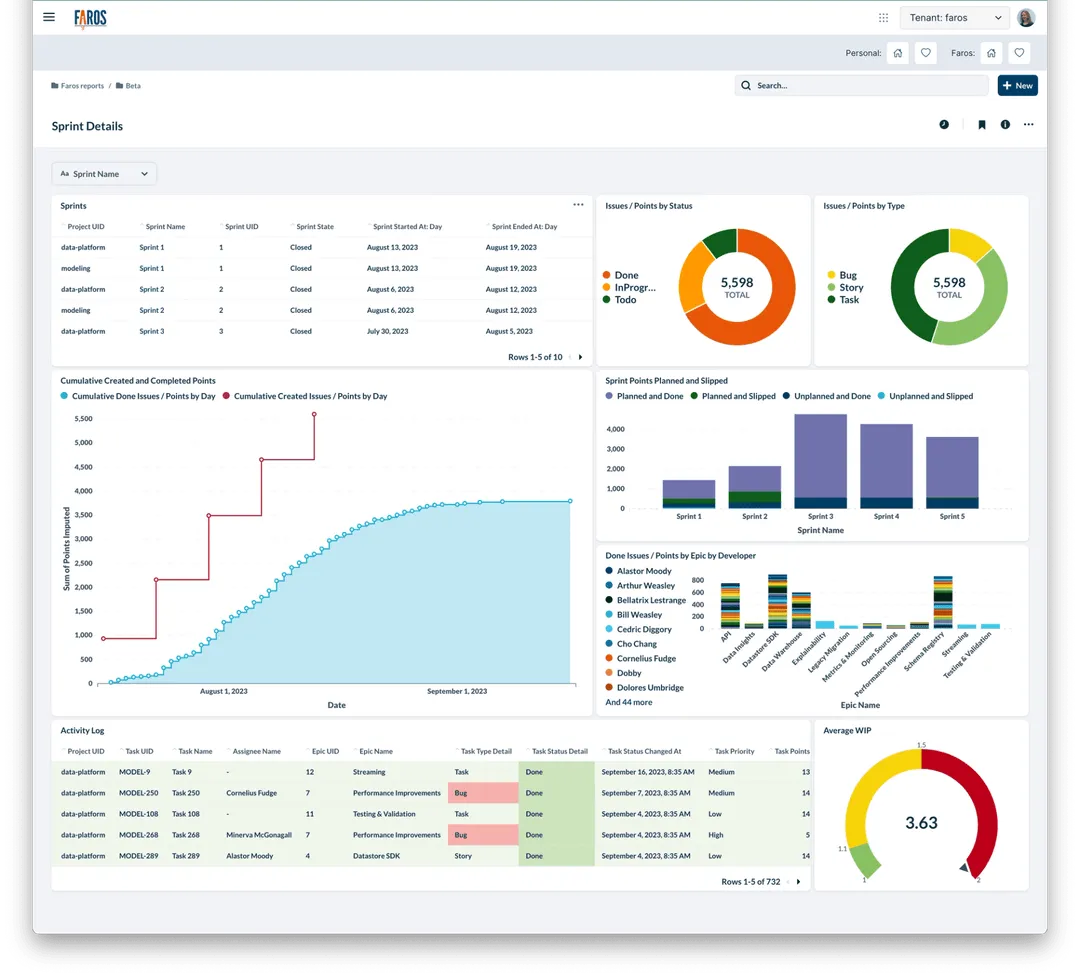
Faros now provides out-of-the-box sprint dashboards! These dashboards help agile teams better understand their sprint health. You can check out how accurate your sprint planning is, how much work is getting pushed to the next sprint, and see detailed breakdowns like the one below.

Sprint Details Dashboard

To try out these new dashboards on your data, navigate to the Beta folder in Faros Reports and check out the Sprint Planning Accuracy and Sprint Accuracy dashboards.

August 17, 2023

New dashboards for visibility into your sprint velocity and accuracy

June 1, 2023

New backend infrastructure powering Faros AI

Recently we have been investing our resources in improving our backend architecture. As we continue to grow, we want to ensure that we are building on a strong foundation - for us this is the Faros graph database. We have replaced our home-grown graph database with Hasura, an industry-standard open-source GraphQL engine. The main benefits of this migration is performance improvements for our customers, easier maintainability for the Faros team, and a standard, more powerful query interface for customers directly accessing the database API.

June 1, 2023

New backend infrastructure powering Faros AI

May 23, 2023

Charts and Dashboards Continue to Improve!

Faros has upgraded its charting tool to include the highly anticipated "now" operator, improved customization, and more!

Highlights include:

  • Cards support a now() operator to reference the current date-time
  • Dashboard filter dropdowns can be customized, giving you more control over what is displayed
  • New link cards in dashboards let you easily link to other dashboards
  • Enhanced data download allows you to download data for a single question or export a question as a PDF

And even more visualization enhancements and refinements:

  • Smarter tooltips offer increased utility in multi-series charts with totals and percentages, time series including days of the week, and more
  • Pivot tables are now optimized for snappier performance and allow you to export pivoted data. We also made the columns resizable, and you can now disable/enable row and column totals
  • Visualization Charts now support customization of series encompassing over 20 groups
  • Chart settings now recognize custom column names
  • Introduced a new visualization type, "Detail," which displays a row as an easy-to-read card (note: this feature may have some issues)

May 23, 2023

Charts and Dashboards Continue to Improve!

April 27, 2023

Introducing Configurable Team Pages

We are excited to announce that new configurable Faros Team pages are available for all customers.

Faros Team Pages provide you with a custom landing page for all of your teams. They serve as a one-stop shop to get the most relevant information for a given team, specifically tailored to what is important to you. In Faros Team Pages, team information is displayed in widgets; you have complete control over what is shown and how it is laid out. Widgets integrate data from your org, your dashboards, and third party systems.

Documentation is available here.

April 27, 2023

Introducing Configurable Team Pages

April 19, 2023

Organize your data in any way with Faros Paths

You can now arbitrarily organize your data using Faros Paths. Faros Paths work like directory paths in a file system. By associating any of the supported entities with Faros Paths, you can add a hierarchy structure to data within your Faros dashboards. This helps you visualize your data at varying depths. Using filters and click-through behavior, you can achieve the same drill-down experience that you find in many other curated Faros dashboards.

April 19, 2023

Organize your data in any way with Faros Paths

April 10, 2023

New Accessible Dashboard Colors

Last week we introduced new dashboard colors to Faros. These vibrant colors are nice to look at, more legible and they are also accessible! Now everyone will be able to see differentiated data in Faros charts.

Don't see the new colors in your charts? If you pre-defined colors in some of your existing charts you'll notice these colors have not been updated. You can keep your existing charts the same or edit their visualization settings to use some of the new colors.

Please note - the default colors are guaranteed accessible for only seven color groupings. If you have charts with more than seven breakouts some of the color combinations may not be accessible.

April 10, 2023

New Accessible Dashboard Colors

March 10, 2023

New Org Overview in Team's Members widget

We've updated your Team Membership widget to now support sub-team views and org counts. This allows you to better understand your org composition at a glance. You can now see a breakdown of

  • All the members who roll up to this org
  • Who is a direct member of this team
  • What teams directly roll up to this org and how large each of them is

Find this improved widget on all of your Team pages. If you wish to disable the sub-teams view, click the edit icon in the upper right-hand corner and define the view to hide sub-teams.

March 10, 2023

New Org Overview in Team's Members widget

March 8, 2023

Power of the Platform: Export your Faros Data to your Favorite System

Custom metrics are the newest way that the Faros platform can be customized to perfectly fit your organization's needs. You can now take a specific metric you compute in any of your systems and import it into Faros over the API! While it's easiest to leverage the built-in Faros metrics, custom metrics can fill in any remaining gaps so you have all the data you need.

If you're interested in writing custom metrics to Faros, please reach our to set up a session with us.

March 8, 2023

Power of the Platform: Export your Faros Data to your Favorite System

March 8, 2023

Introducing our Out of the Box Retro Dashboard

We've released a new out-of-the-box dashboard to help guide conversation in your team's next retrospective meeting. With this dashboard you can easily see what your team has been working on and how you are doing with regards to task and PR hygiene. As with all of our other dashboards, feel free to clone this dashboard and make it your own!

You can find this dashboard under the Beta folder of your Faros Reports collection. Let us know any feedback you have 🙏

March 8, 2023

Introducing our Out of the Box Retro Dashboard

March 7, 2023

Improved Task Cycle Time Definition

Our new Task Cycle Time definition now only takes into account tickets that were marked as In Progress for some duration. Task Cycle Time is now the amount of time it takes for actively worked on tickets to go from
when they were first marked as in progress to when they were last closed.

Previously, we used the same general definition:
the time from when the task first went to in progress to the time the task was finally done. But, if a task never went into progress, we changed the start time to the time from when the task was created.

The problem with this was that if you just had a task sitting around in the backlog for 5 years, and then closed out as "Abandoned", it would look like it had a task cycle time of 5 years. To remedy this, we now only consider tasks that ever went into an "In Progress" state.

To learn more about task cycle time and different definitions of it, check out our docs.

March 7, 2023

Improved Task Cycle Time Definition

February 21, 2023

Chart and Dashboards Enhancements

Faros has upgraded its charting tool to now include search, new datetime functions, improved charts, and more!

Highlights include

  • Revamped row charts, more chart colors, and other improvements
  • New datetime functions to extract component like hour, day, etc, from datetime fields, and other datetime functions such as datetimeDiff and convertTimezone
  • More intuitive filtering UI that simplifies multiple filter selection
  • Search bar, to easily find charts and dashboards
  • Deep copying of dashboards
  • Plus additional bug fixes and performance improvements!

February 21, 2023

Chart and Dashboards Enhancements

December 20, 2022

Get the Full Picture on Software Quality with the New QA Module

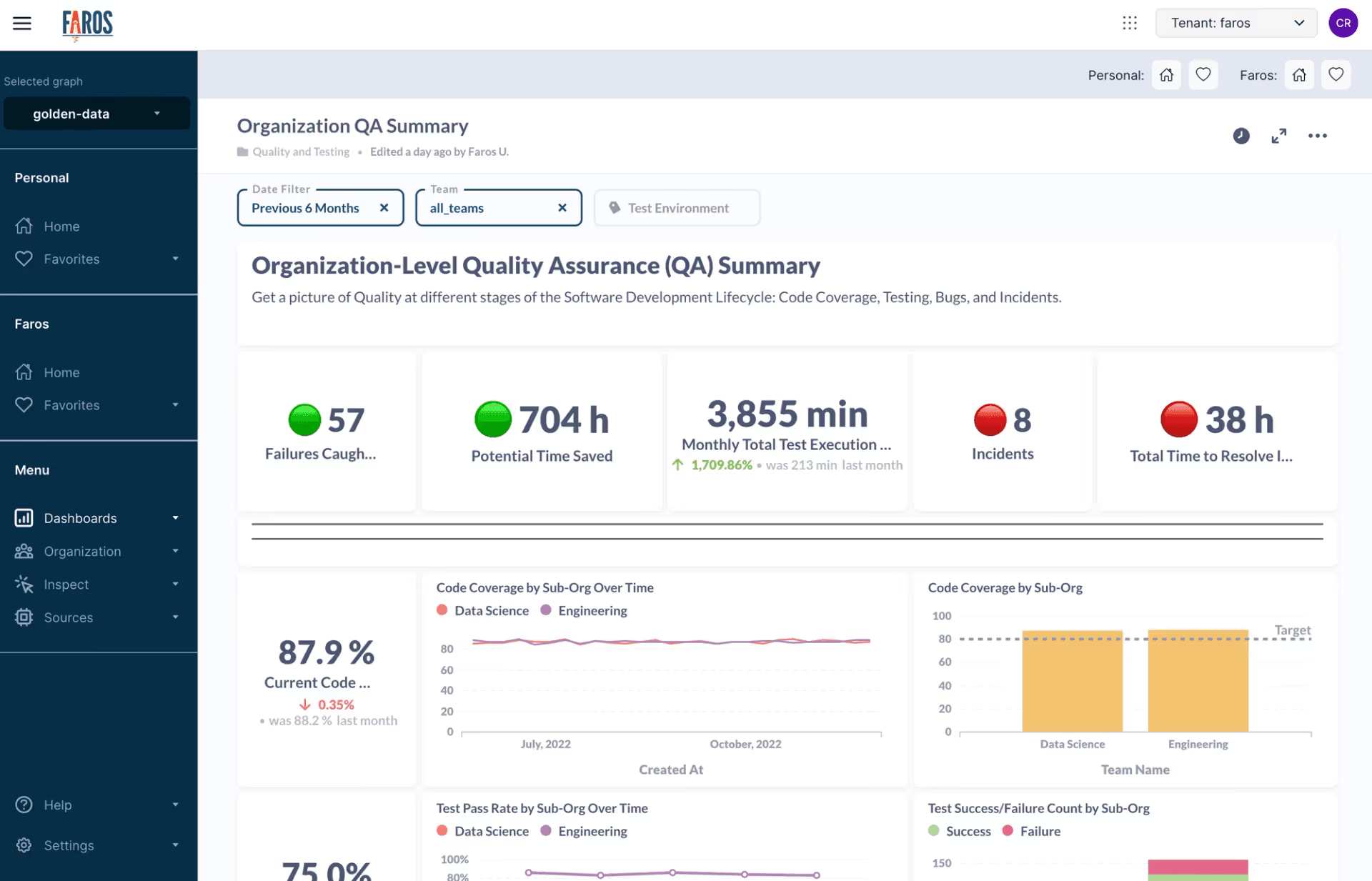
You can now get a complete picture of Quality across your entire Software Development Lifecycle using the new QA Module Dashboards. They make it easy to bring together information from many diverse components into a single place. At a glance, you can learn about trends and relationships in your:

  • Code Quality from sources like SonarQube or events
  • Testing and Deployment from your CI/CD pipeline
  • Software Bugs from your ticketing system
  • Incidents from a source such as PagerDuty
The Organization-level QA Dashboard shows Quality trends across teams.

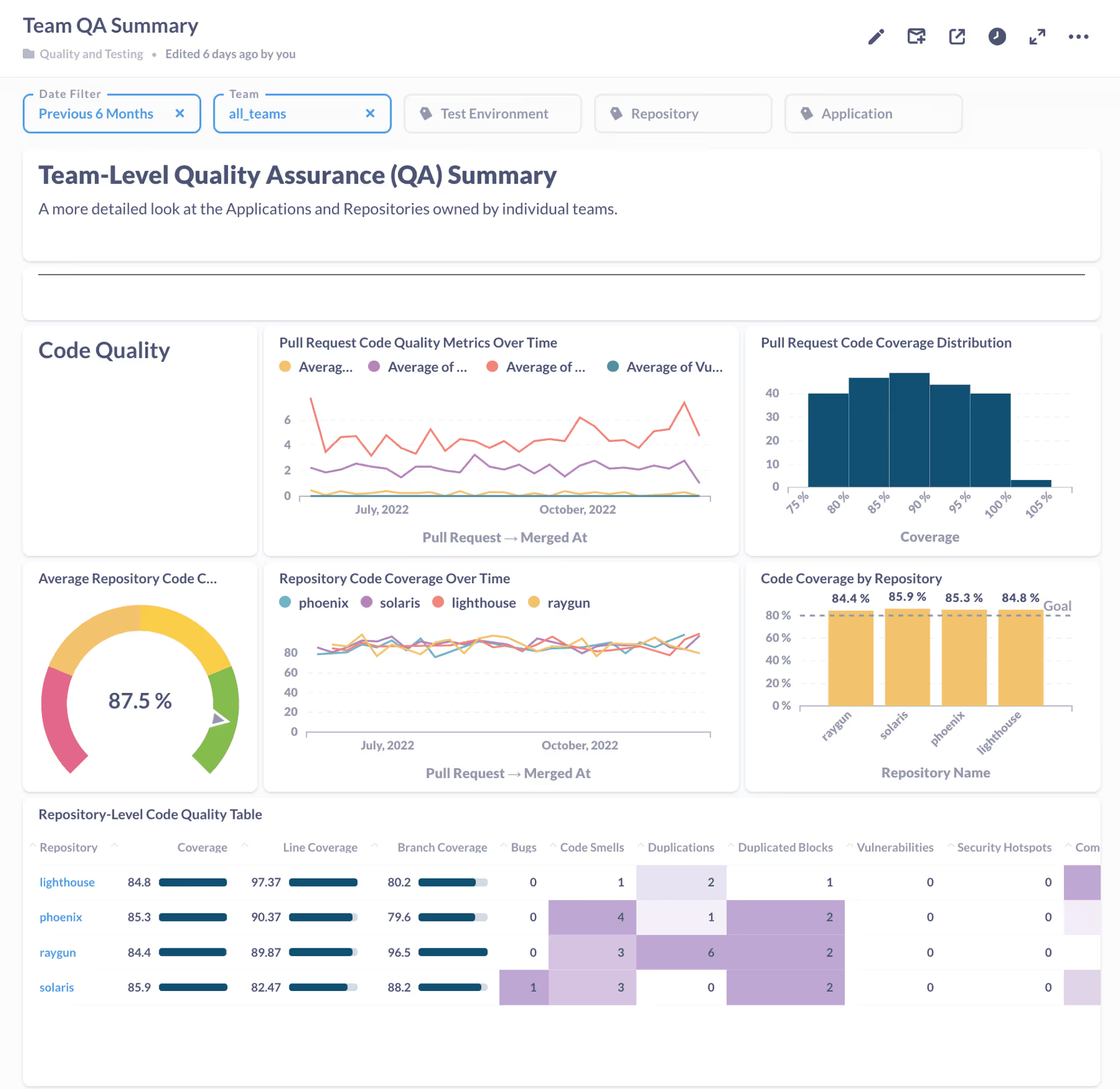
The QA Module contains two dashboards that give either a wider or narrower perspective on the metrics. The first is an Organization-level view where someone like a Department Head can get a great overview of how all the teams within the organization are doing on their Quality metrics. The other view is at a Team-level and it’s a great place for an Engineering Manager to really dive into the details of Quality metrics for applications and repositories owned by their individual teams.

The Team-level Dashboard goes into much more detail on a variety of quality metrics.

The QA Module is available under the Quality and Testing folder within Faros Reports. It is a premium add-on in the Faros platform; please contact Faros for more information.

December 20, 2022

Get the Full Picture on Software Quality with the New QA Module

November 18, 2022

Intelligent Joins

We are introducing a new feature to make it much easier to create charts and reports when our data is spread across multiple tables. Data is now auto-joined for common use cases! You can now skip creating most joins explicitly and go directly from selecting your data to choosing fields on adjacent tables.

Notice that in the example above, you can now filter Pull Request Review based on information from other tables like the Repository or Author and Reviewer directly without declaring a join.

This feature applies everywhere you interact with fields in the Question Editor; Filter, Summarize, Custom Columns, and Sorting. In addition to the fields on the table you are working with, you will now be able to expand related tables and select fields from those as well. The join will automatically be applied on the correct join ID when you run your query.

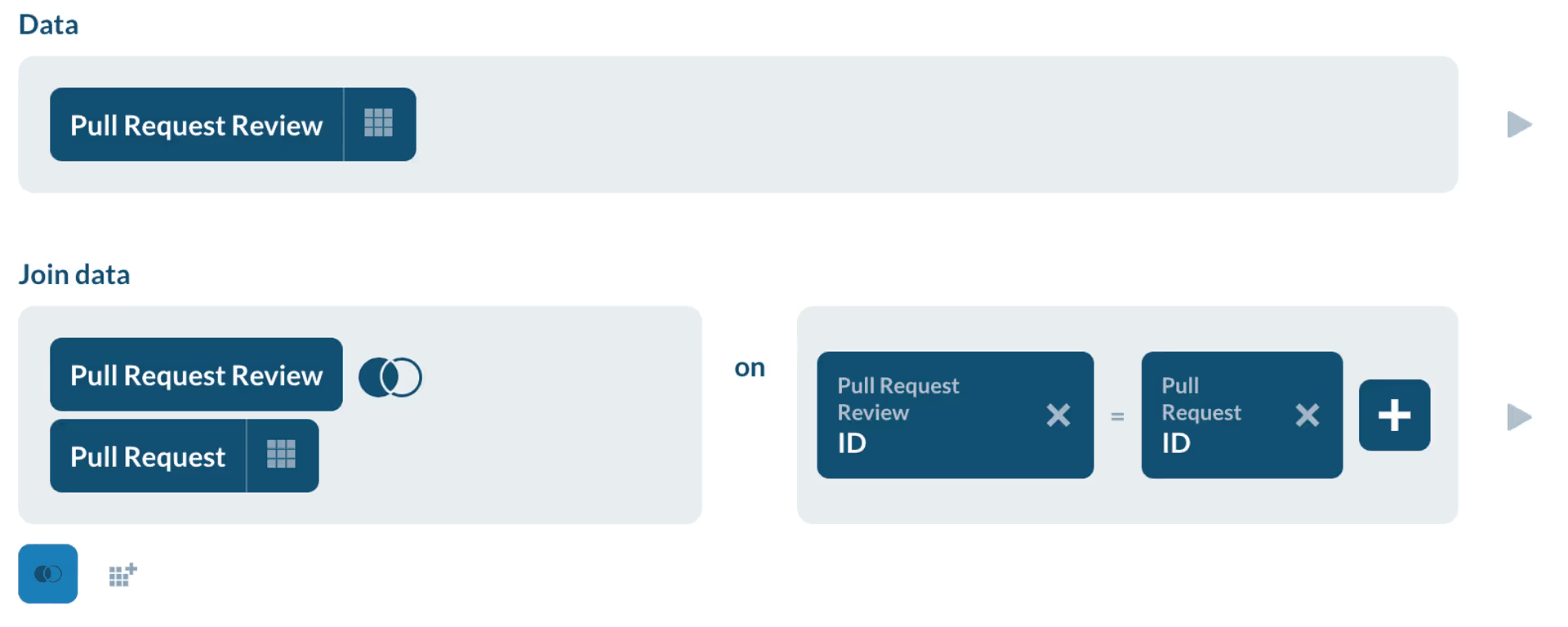
This feature only looks one level deep at tables directly related to your main table. If you need to do multiple levels of joins, (e.g. TableA join TableB join TableC) you would still need to declare those joins as before. BUT, those declarations are even easier now, too, because the table ID’s will now be automatically populated once you select the table you are joining to.

Once you select the “Pull Request” table to join with, ID’s are automatically populated.

There are still some situations where it does not make sense to have every join pre-defined, so don’t worry if you don’t see the particular relationship you’re interested in; everything will still work like it did before by manually specifying the join tables and ID’s.

November 18, 2022

Intelligent Joins

November 17, 2022

Custom Security Policies

In order to provide our customers with custom security policies that meet their needs we added the ability for tenant owners to customize the security policies for their tenant account.

An owner can now modify settings such as:

  • MFA enforcement
  • User lockout after X password attempts
  • Password history
  • Idle session timeout
  • Force re-login on session expiry
  • Maximum concurrent sessions
  • Login restrictions based on IP addresses

November 17, 2022

Custom Security Policies

Contact us
Tell us what you want to achieve with Faros AI and we’ll show you how.
Want to learn more about Faros AI?
An illustration of a lighthouse in the sea

Thank you!

You will get an email soon. Feel free to download Faros AI Community Edition.
Oops! Something went wrong while submitting the form.